Showing posts with label mini acdp. Show all posts

Wednesday, 18 May 2022

Yanhua Mini ACDP + Module 24 Add JLR 2018+ Smart Key

This is a tutorial on how to add Jaguar/ Land Rover 2018+ smart key with Yanhua Mini ACDP & Module 24. The procedure requires a working key, read the post below to learn how it works.


Step1. Replace RFA Module/ RFA Chip

You can replace a new RFA module according to vehicle RFA model. Also you can replace the RFA main chip.

yanhua-mini-acdp-module-24-add-jlr-2018-smart-key-(1)


Step2. Write Initial Data

* If your chips or modules already have original data, you can skip this step. Otherwise, the initial data needs to be written.


Note: Please confirm the current module is a new RFA module or the the RFA main chip has been replaced with a new chip!


Tools Required:

Module 24

RFA module

20PIN cable

OBP+ICP adapter

ACDP programmer

Connect ACDP host, OBP+ICP adapter, interface clip & RFA module.


Mini ACDP >> Jaguar/ LandRover >> Program smart key(2018-) >> RFA write initial data >> SPC560B60L3 >> Write initial data >> JPLA(select the option according to RFA module)

To check connection diagram, press "Help".


Please connect ACDP with RFA module, don't cut the power or pull out the device during the programming!


Pin detection passed. If fails, please adjust the clip position to re-test.

Prepare to download data from the server, please keep the network stable during the download!

Prepare to write data, please do not power off or unplug the device & adapter during data writing!

Writing CFLASH data, please wait...

Writing chip data finished.

Save data file success.

yanhua-mini-acdp-module-24-add-jlr-2018-smart-key-(2)

yanhua-mini-acdp-module-24-add-jlr-2018-smart-key-(3)

yanhua-mini-acdp-module-24-add-jlr-2018-smart-key-(4)

yanhua-mini-acdp-module-24-add-jlr-2018-smart-key-(5)


Step3. Identify RFA Information

Remove the clip and install the interface board.

Identify RFA Info >> Continue 

Check the system information, make sure the RFA module is unlocked.

Read system info finished.

Save info file success.

yanhua-mini-acdp-module-24-add-jlr-2018-smart-key-(6)


Step4. Program Key via OBD

Load the RFA module, connect ACDP programmer to the vehicle via OBD.

Prepare 2 smart keys that can be programmed(working key is acceptable).


Replace RFA(JPLA/K8D2) program key >> Add smart key(auto mode)

Connect ACDP to the vehicle OBDII port.

Confirm the system information,

Continue >> OK 


Prepare to program, please make sure the stable power supply and DO NOT pull out the device during the programming!

Confirm the current vehicle ignition is off, the program will automatically open the ignition!

yanhua-mini-acdp-module-24-add-jlr-2018-smart-key-(7)

yanhua-mini-acdp-module-24-add-jlr-2018-smart-key-(8)

Programming RFA module is complete, the smart key program process is about to begin. Press "Continue".

Confirm the current vehicle ignition is off, the program will automatically open the ignition!


Please prepare at least 2 new keys and put them in the car. Press the unlock key during  key learning process. Press "OK", follow the prompts to start program keys. Please complete all the key learning operation within 30s.


Please hold the smart key that need to program in your hand.

Press the unlock button hard for 4s, and the car horn will sound twice to indicate that the current key has been programmed successfully. 


The first smart key has been programmed.

Please prepare the second smart key to be programmed!

Just repeat same operations as before...


Key programming successful. 

To add more keys, press "Yes". Otherwise, press "No".

Please confirm the key information, press "OK".

Done.

yanhua-mini-acdp-module-24-add-jlr-2018-smart-key-(9)

yanhua-mini-acdp-module-24-add-jlr-2018-smart-key-(10)

yanhua-mini-acdp-module-24-add-jlr-2018-smart-key-(11)

http://blog.obd2shop.co.uk/yanhua-mini-acdp-module-24-add-jlr-2018-smart-key/

Sunday, 20 June 2021

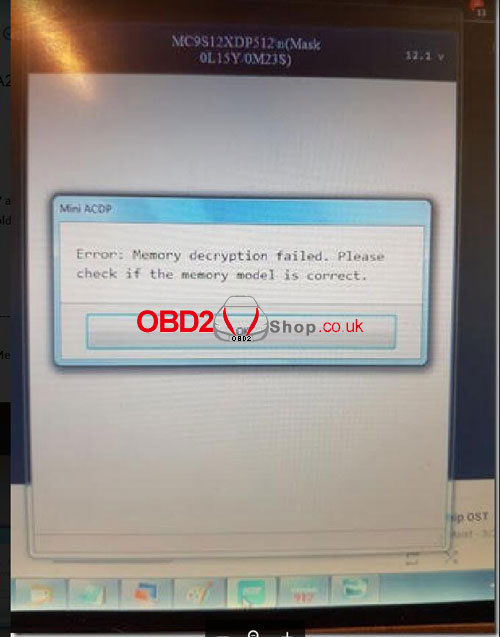
Solved! Yanhua Mini ACDP Read BMW CAS3/3+ Memory Decryption Failed

Problem

My Yanhua Mini ACDP Master will not read BMW CAS3, 0L15Y always has memory decryption error, 0L01Y has an error with connection board targets. No method to read CAS3 with ICP solderless adapter. It says: “ Error: Memory decryption failed. Please check if the memory model is correct.”


CAS3 – 0L15Y: Pin detect good, always error with Memory decryption. CAS3 board is V2, No C_GND pin.

CAS3 – 0L01Y: Always pin detect error on ETX.

CAS3 Adapter board makes contact with the wrong pin.

For example, 0L15Y, good pin detection, but CAS 0L01Y has a pinned target in the wrong place, the capacitor blocks the signal.

solved-yanhua-mini-acdp-read-bmw-cas3-memory-decryption-failed-01

solved-yanhua-mini-acdp-read-bmw-cas3-memory-decryption-failed-02

solved-yanhua-mini-acdp-read-bmw-cas3-memory-decryption-failed-03

solved-yanhua-mini-acdp-read-bmw-cas3-memory-decryption-failed-04

Sometimes, the CAS3/3+ reading error may say: “Analyze the data error. Please check this CAS is a new CAS or blank CAS.” as well.

solved-yanhua-mini-acdp-read-bmw-cas3-memory-decryption-failed-05

Solution

If the above problems occurred, the decryption progress bar will reach 100%. But in normal cases, the chip decryption progress bar will not reach 100%. So it is necessary to check whether the C-GND probe on the interface board is removed or cut. Reinstall the interface board to read the data once.


The C-GND pin interface board locations are shown as below:

solved-yanhua-mini-acdp-read-bmw-cas3-memory-decryption-failed-06

solved-yanhua-mini-acdp-read-bmw-cas3-memory-decryption-failed-07

Updates

Thanks to the Obd2shop engineer, the problem was solved! 

I can use Yanhua ACDP BMW to read CAS3 decryption data now.


https://www.obd2shop.co.uk/


Thursday, 13 May 2021

How to Register & Activate Yanhua Mini ACDP Programming Master?

This is a tutorial on how to start Yanhua Mini ACDP Programming Master, including registration, activation, language switch & operation learning.


How to register & activate?

Download Mini ACDP app on smartphone, go to 

Me >> Login >> Register >> Input info (phone, password, name & mail)

Note: the password must include letters, numbers & symbols.


The ACDP ID & SN code are right on the device, you can scan the OR code directly or manually input it. 


Remember to select “Agree software licensing and service agreement”.

Press “Sign up now”.


Congratulations!

Registration succeeded. 


Now ACDP device was activated, you can start to use it.

Please keep in mind the info you registered for.

register-activate-yanhua-mini-acdp-programming-master-01

register-activate-yanhua-mini-acdp-programming-master-02

How to switch the language?

System settings >> Language

It supports English & Chinese.

register-activate-yanhua-mini-acdp-programming-master-03

How to start ACDP?

1. Check FAQ

Technicians >> ACDP sales FAQ/ ACDP technical FAQ


2. Press “Learning”.

Here are a lot of videos about ACDP operations you can learn from.

register-activate-yanhua-mini-acdp-programming-master-04

Yanhua Mini ACDP car key programming no longer needs soldering iron, supports to program module on BMW, Mercedes Benz, Audi...etc. For full configuration, please choose Full Set YANHUA Mini ACDP.

https://www.obd2shop.co.uk/


Friday, 25 October 2019

(Fixed) ACDP programmed jaguar 2016 Europe all keyless lost, remote didn't work

One user feedback he used Yanhua Mini ACDP with Module 9 for jaguar 2016 Europe all keyless lost (keyless is 434mhz) key programming. After complete programming, the key can start the car, but the remote couldn't work.

Yanhua engineer solution:
Change the key and try to match it.
If failed, maybe there's something wrong with the vehicle itself. The ability to start the vehicle indicates that the keys have been matched.

Here is the dialogue between Yanhua technician and the user:

ACDP programmed jaguar 2016 Europe all keyless lost


Good luck.

www.obd2shop.co.uk

Thursday, 22 August 2019

(Fixed) Yanhua Mini ACDP test CAS2 error "EXT: Poor contact..."

Used Yanhua Mini ACDP to make key on BMW CAS2, got error "EXT: Poor contact. please check".
acdp-test-cas2-error-ext-poor-contact-01


The solution offered by obd2shop.co.uk engineer:
Use this cable to wire the line according to the color.
acdp-test-cas2-error-ext-poor-contact-02
acdp-test-cas2-error-ext-poor-contact-03

acdp-test-cas2-error-ext-poor-contact-04


The fact is the Mini ACDP APP comes with the help images and videos on how to use ACDP to make a key on CAS2.

http://blog.obd2shop.co.uk/fixed-yanhua-mini-acdp-test-cas2-error-ext-poor-contact/