Showing posts with label yanhua mini acdp vw. Show all posts

Sunday, 1 September 2024

Yanhua Mini ACDP Module 34 VW MQB 1402 5A Mileage Correction

This is a tutorial on mileage correction for the VW MQB system 1402 5A chip model instrument with Yanhua Mini ACDP 2 + Module 34. 


Check the video to view the detailed operation:


Turn on the power switch on the car and light up the instrument panel.

Record the original mileage, then remove the instrument panel.

Connect & open the Mini ACDP APP.

Make sure the upper right corner that the ACDP device has been bound.


VW >> VW MQB IMMO >> MQB48(R7F7014xx 5A) >> Help

Ensure the instrument is of the 5A type.


ICP ODO >> R7F701402 Interface Board R7F701402 >> Help

Connect the instrument to ACDP according to the help document.

yanhua-acdp-module-34-vw-mqb-mileage-correction-1

yanhua-acdp-module-34-vw-mqb-mileage-correction-2

yanhua-acdp-module-34-vw-mqb-mileage-correction-3

Auto mode >> OK

Please use the ACDP standard power adapter(voltage+ 12V, current>= 2.5A)


Note:

Repairing the mileage requires a full-chip erase risky operation, please ensure the chip data has been backed up correctly.

OK >> Continue 

Verify chip information, click Continue.

Click OK to save all the chip's backup data.


Verify instrument information, click Continue.

Enter the value to modify the mileage: 800km

Click OK to save the revised mileage data.


Data will be written, please make sure that the ACDP and meter are connected.

The mileage calibration is completed!


Install the instrument panel back to the car, then turn it on.

Check if the mileage displayed on the instrument panel is normal.

Done.

yanhua-acdp-module-34-vw-mqb-mileage-correction-4

yanhua-acdp-module-34-vw-mqb-mileage-correction-5

yanhua-acdp-module-34-vw-mqb-mileage-correction-6

yanhua-acdp-module-34-vw-mqb-mileage-correction-7

www.obd2shop.co.uk


Monday, 20 May 2024

Yanhua Mini ACDP 2 + Module 33 Add VW MQB48 5A Smart Key

This is a tutorial on how to use Yanhua Mini ACDP 2 + Module 33 to add a smart key for Volkswagen MQB48 5A. Read the article carefully to learn.


Check the video for full operation:


Step1. Obtain IMMO Data

1. Remove the instrument cluster from the car, and open the cluster shell to check the chip model.

2. Power on Mini ACDP-2.


Mini ACDP >> VW >> VW MQB IMMO >> MQB48(VDO/JCI-NEC35xx Lock) >> ICP read dashboard >> D70F3529 >> Help

Follow the diagram to connect the device & instrument properly.


MQB82 interface board >> OK >> OK >> Continue >> Continue

The data was read successfully!

Please save all backup data of the chip.

Execution complete!


Reinstall the instrument panel into the vehicle and confirm that the vehicle is functioning properly.


IMMO >> OBD identify Help

Connect Mini ACDP 2 to the OBDII port properly.


OBD identify >> OK

Connect ACDP to vehicle OBDII!

If you have a working key, please insert it to/near the ignition switch and light the meter!

If all key lost, open the headlight and step on the brake!

Turn on the switch, and click "Continue".

Recognized vehicle info is correct.

OBD identify info to finish.


Obtain IMMO data >> Load meter data calc IMMO >> OK

Prepare the ICP reading of the meter chip data, if the meter has an external EEPROM 95320/95128 chip, also need to prepare the external EEPROM data!

Please select the NEC chip data for the instrument.

Does the meter need to load external EEPROM 95320/95128 data? 

No - EEPROM is not loaded.


The IMMO data will be calculated soon, please keep the network smooth during the data calculation!

Please save IMMO data.

Obtain IMMO data finish.

yanhua-mini-acdp-2-module-33-add-vw-mqb48-5a-smart-key-1

yanhua-mini-acdp-2-module-33-add-vw-mqb48-5a-smart-key-2

yanhua-mini-acdp-2-module-33-add-vw-mqb48-5a-smart-key-3

yanhua-mini-acdp-2-module-33-add-vw-mqb48-5a-smart-key-4

yanhua-mini-acdp-2-module-33-add-vw-mqb48-5a-smart-key-5

yanhua-mini-acdp-2-module-33-add-vw-mqb48-5a-smart-key-6

Step2. Make Dealer Key

Make dealer key >> Add key(Need work key) >> Duplicate the key Help

Connect ACDP to PCF-KEY adapter.

Duplicate the key >> OK

Place the work key correctly on the PCF-KEY adapter.

Continue >> Please select IMMO data

IMMO info is correct.

Please save sync data.


Connect the ACDP to the PCF-KEY adapter.

Place the blank key that has been changed to the original car's lost key ID on the PCF-KEY adapter correctly!


Note: The new key should be a blank key that ID can be changed and the blank key has been changed to the ID of the lost key.


Place the blank key that has been changed to the original car's lost key ID on the PCF-KEY adapter correctly.

The key info is correct.

Select your vehicle manufacturer: VW

Programming key data is about to begin, and forbidden to power off or unplug the device during operation!

Make dealer key finish.

yanhua-mini-acdp-2-module-33-add-vw-mqb48-5a-smart-key-7

yanhua-mini-acdp-2-module-33-add-vw-mqb48-5a-smart-key-8

yanhua-mini-acdp-2-module-33-add-vw-mqb48-5a-smart-key-9

Step3. Learn Key

OBD learn key >> OK >> Continue

The read system info is correct.

Please select IMMO data.

Enter the number of learning keys: 2

1. Have all the keys ready, the keys that are not learned will not be able to start the car.

2. Don't turn off the ignition during learning, if the other keys are too close to the induction coil may cause learning failure.

3. Put the first key close to or insert the induction coil, and click "Continue".


Put the keys close to or insert the induction coil, and click "Continue".

Number of keys learned: 2

Completed.


Please try on the car and verify if the added key functions are normal.

yanhua-mini-acdp-2-module-33-add-vw-mqb48-5a-smart-key-10

yanhua-mini-acdp-2-module-33-add-vw-mqb48-5a-smart-key-11

www.obd2shop.co.uk


Monday, 6 May 2024

Yanhua Mini ACDP-2 Add VW 4.5th MQB 3526+95320 Smart Key

This is a tutorial on how to use Yanhua Mini ACDP-2 + Module 33 to add a smart key for the Volkswagen 4.5th generation MQB(3526+95320).


Remove the instrument cluster from the car and open the cluster shell to check the chip model.

Power on Mini ACDP-2.


Open the Mini ACDP app.

Confirm the SN is showing in the upper right corner, which means the device is connected to your phone or PC.

VW >> VW MQB IMMO >> MQB 4.5TH(NEC+95320) >> ICP Read Dashboard >> D70F3526(A2C81589700)(A2C99606600) >> MQB74 interface board D70F3523/ 24/ 25/ 26+95320

*Click "Help" to check the connection diagram.


Please use the ACDP standard power adapter(voltage+12V, current >= 2.5A).

Please connect the main unit and the meter.

Continue >> Continue

Data read successfully.

Please save all backup data of the chip.

OK >> OK

Please save the EEPROM data.


Reinstall the instrument panel into the vehicle and confirm that the vehicle is functioning properly.

yanhua-mini-acdp-2-add-vw-4-1

yanhua-mini-acdp-2-add-vw-4-2

yanhua-mini-acdp-2-add-vw-4-3

yanhua-mini-acdp-2-add-vw-4-4

IMMO >> Step1: OBD identify Help

Connect the ACDP to the vehicle's OBDII port properly.


Step1: OBD identify >> OK

Connect ACDP to vehicle OBDII!

If have a working key, please insert it to/near the ignition switch and light the meter!

If all key lost, open the headlight and step on the brake!

Continue >> OK

OBD identifies info to finish.


Obtain IMMO data >> Load meter data calc IMMO >> OK

Prepare the ICP reading of the meter chip data, if the meter has an external EEPROM 95320/95128 chip, also need to prepare the external EEPROM data!

Please select the NEC chip data for the instrument.

Does the meter need to load external EEPROM 95320/95128 data? 

Yes - EEPROM loaded.


Please select external EEPROM 95320/95128 data.

The IMMO data will be calculated soon, please keep the network smooth during the data calculation!

Please save IMMO data.

OK >> OK >> OK

Obtain IMMO data finish.

yanhua-mini-acdp-2-add-vw-4-5

yanhua-mini-acdp-2-add-vw-4-6

yanhua-mini-acdp-2-add-vw-4-7

yanhua-mini-acdp-2-add-vw-4-8

Make dealer key >> Duplicate the key >> OK

Connect the ACDP to the PCF-KEY adapter.

Place the blank key that has been changed to the original car's lost key ID on the PCF-KEY adapter correctly!

Note: the new key should be a blank key that ID can be changed and the blank key has been changed to the ID of the lost key.


Place the blank key that has been changed to the original car's lost key ID on the PCF-KEY adapter correctly.

Continue >> Continue

Please select IMMO data >> Continue >> VW

Programming key data is about to begin, and forbidden to power off or unplug the device during operation!

Make dealer key finish.


OBD learn key >> OK >> Continue >> Continue

Please select IMMO data.

Enter the number of learning keys: 2


Tips

1. Have all the keys ready, the keys that are not learned will not be able to start the car.

2. Don't turn off the ignition during learning, if the other keys are too close to the induction coil can may cause learning failure.

3. Put the first key close to or insert the induction coil and click "Continue".


Put the 1st key close to or insert the induction coil, and click "Continue".

Put the 2nd key close to or insert the induction coil, click "Continue".

Number of keys learned: 2

Completed learning 2 keys.


The smart key addition is complete.

Please try on the car and verify if the added key functions are normal.

yanhua-mini-acdp-2-add-vw-4-9

yanhua-mini-acdp-2-add-vw-4-10

yanhua-mini-acdp-2-add-vw-4-11

Video guides:


www.obd2shop.co.uk


Monday, 5 June 2023

Yanhua ACDP VW/Audi 0BH Continental Gearbox Mileage Correction

This is a tutorial on how to use Yanhua Mini ACDP + Module 30 to do VW/Audi 0BH Continental gearbox mileage correction. Users who already have Module 19 or Module 25 can buy the Module 30 Authorization directly.


Check the video to learn:

Required Accessories

TCM

ACDP Programmer

0DE interface board

DB15-LAN adapter

TCU cable


Connection

1. Connect the 0DE interface board to the DB15-LAN adapter.

2. Short-circuit the CAN resistor on the DB15-LAN adapter to the "CAN-R" end.

3. Unplug the original gearbox plug. Install the 0DE interface board to the vehicle TCU plug. Connect to the ACDP host and power up.

yanhua-acdp-vw-audi-0bh-continental-gearbox-mileage-correction-1

Operation

* Make sure the ACDP device is connected to WiFi.


Mini ACDP >> VW >> Gearbox mileage correction >> Audi >> DQ500(0BH CONTINENTAL) >> Identify

Please use the ACDP standard power adapter(voltage+ 12V, current > = 2.5A).

Please connect the ACDP with gearbox.

Check the mileage and time of the original TCU.

Identify finish.

yanhua-acdp-vw-audi-0bh-continental-gearbox-mileage-correction-2

yanhua-acdp-vw-audi-0bh-continental-gearbox-mileage-correction-3

yanhua-acdp-vw-audi-0bh-continental-gearbox-mileage-correction-4

Mileage correction(auto mode) >> OK >> Continue >> After reading the system info, OK >> Save EEPROM data

Click the dialog box and enter the mileage you want: 14000km

Click "OK".


It is prohibited to power off or unplug devices during the chip data-writing process.

Click "Continue".

The mileage correction is completed.


Time correction(auto mode) >> OK >> Continue >> Read system info >> Save EEPROM

Click the dialog box and enter the time you want: 350h

Click "OK".

Ready to write chip data, please don't cut the power nor pull out the device during the programming! Click "Continue".

The time correction is completed.


Go back to identify again.

As we can see, both the mileage and time have been modified.

VW/Audi 0BH Continental TCU odometer correction has been done!

yanhua-acdp-vw-audi-0bh-continental-gearbox-mileage-correction-5

yanhua-acdp-vw-audi-0bh-continental-gearbox-mileage-correction-6

yanhua-acdp-vw-audi-0bh-continental-gearbox-mileage-correction-7

www.obd2shop.co.uk

Wednesday, 26 January 2022

Yanhua Mini ACDP Clone VW Gearbox, Possible?

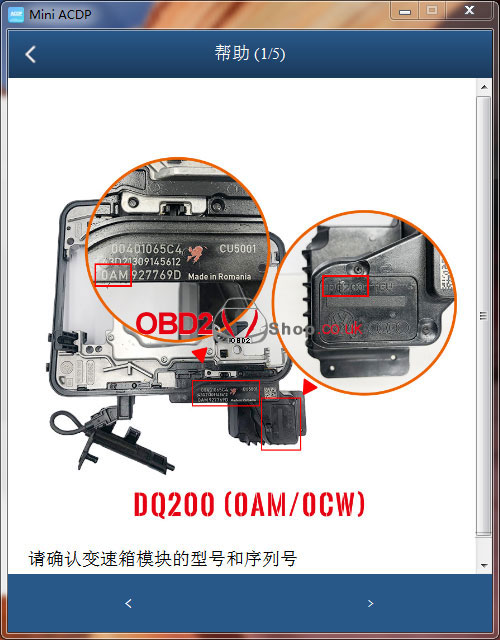
The answer is yes. Yanhua Mini ACDP + Module 13 support to clone Volkswagen gearbox. Besides, Mini ACDP can also support Audi DQ200(0AM/0CW), DQ250(02E/0D9), DL382(0CK), DL501(0B5), VL381(0AW) models and etc.

yanhua-mini-acdp-clone-vw-gearbox-1

yanhua-mini-acdp-clone-vw-gearbox-2


ACDP module 13 interface board replaces the traditional wiring connection to make it easier. It’s much efficient & safe, can greatly save time when programming.


The connection diagram can be found in Help.

1. Make sure the model & SN of gear box.

2. Install interface board into gearbox as image.

3. Connect ACDP, OBP+ICP adapter, interface board & gearbox.

yanhua-mini-acdp-clone-vw-gearbox-3

yanhua-mini-acdp-clone-vw-gearbox-4

yanhua-mini-acdp-clone-vw-gearbox-5

Now you can start to clone VW gearbox!