Showing posts with label yanhua mini acdp audi. Show all posts

Monday, 5 June 2023

Yanhua ACDP VW/Audi 0BH Continental Gearbox Mileage Correction

This is a tutorial on how to use Yanhua Mini ACDP + Module 30 to do VW/Audi 0BH Continental gearbox mileage correction. Users who already have Module 19 or Module 25 can buy the Module 30 Authorization directly.


Check the video to learn:

Required Accessories

TCM

ACDP Programmer

0DE interface board

DB15-LAN adapter

TCU cable


Connection

1. Connect the 0DE interface board to the DB15-LAN adapter.

2. Short-circuit the CAN resistor on the DB15-LAN adapter to the "CAN-R" end.

3. Unplug the original gearbox plug. Install the 0DE interface board to the vehicle TCU plug. Connect to the ACDP host and power up.

yanhua-acdp-vw-audi-0bh-continental-gearbox-mileage-correction-1

Operation

* Make sure the ACDP device is connected to WiFi.


Mini ACDP >> VW >> Gearbox mileage correction >> Audi >> DQ500(0BH CONTINENTAL) >> Identify

Please use the ACDP standard power adapter(voltage+ 12V, current > = 2.5A).

Please connect the ACDP with gearbox.

Check the mileage and time of the original TCU.

Identify finish.

yanhua-acdp-vw-audi-0bh-continental-gearbox-mileage-correction-2

yanhua-acdp-vw-audi-0bh-continental-gearbox-mileage-correction-3

yanhua-acdp-vw-audi-0bh-continental-gearbox-mileage-correction-4

Mileage correction(auto mode) >> OK >> Continue >> After reading the system info, OK >> Save EEPROM data

Click the dialog box and enter the mileage you want: 14000km

Click "OK".


It is prohibited to power off or unplug devices during the chip data-writing process.

Click "Continue".

The mileage correction is completed.


Time correction(auto mode) >> OK >> Continue >> Read system info >> Save EEPROM

Click the dialog box and enter the time you want: 350h

Click "OK".

Ready to write chip data, please don't cut the power nor pull out the device during the programming! Click "Continue".

The time correction is completed.


Go back to identify again.

As we can see, both the mileage and time have been modified.

VW/Audi 0BH Continental TCU odometer correction has been done!

yanhua-acdp-vw-audi-0bh-continental-gearbox-mileage-correction-5

yanhua-acdp-vw-audi-0bh-continental-gearbox-mileage-correction-6

yanhua-acdp-vw-audi-0bh-continental-gearbox-mileage-correction-7

www.obd2shop.co.uk

Wednesday, 8 March 2023

Yanhua ACDP read IMMO data for Audi A4/A5/Q5 (BCM2 encrypted) by ICP

Yanhua recently released ACDP module 29: Audi Gen5 BCM2 IMMO Module, which supports adding keys and all keys lost for Audi A4/A5/Q5 2013-2018 and other models. Support adding keys for Audi A6/A7/A8 2013-2019 and other models.


This article will take Audi A4/A5/Q5 BCM2 encrypted as an example to show you how to use the ACDP+29 module to read IMMO data via ICP.


Select "VW" on the ACDP APP interface and enter "Audi 5th BCM2 IMMO".

yanhua-acdp-read-audi-a4-a5-q5-bcm2-encrypted-immo-data-1

Step 1. OBD identify

yanhua-acdp-read-audi-a4-a5-q5-bcm2-encrypted-immo-data-2

Step 2. Get BCM2 IMMO data

yanhua-acdp-read-audi-a4-a5-q5-bcm2-encrypted-immo-data-3

yanhua-acdp-read-audi-a4-a5-q5-bcm2-encrypted-immo-data-4

Note: To begin this step, you need to connect the relevant equipment.


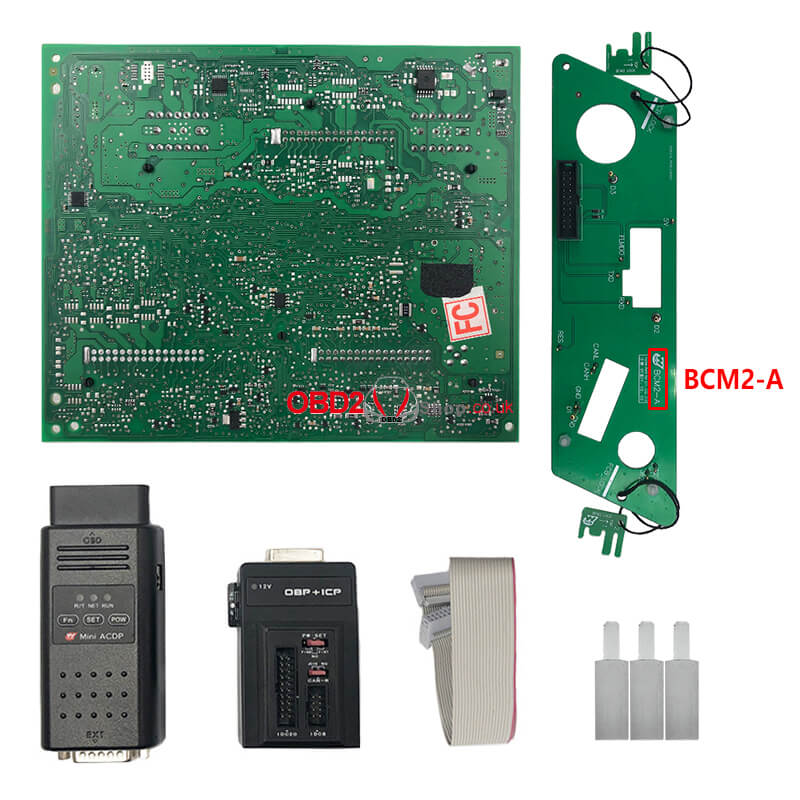
① Prepare ACDP, OBP+ICP adapter, BCM2-A interface board and BCM2 module.

yanhua-acdp-read-audi-a4-a5-q5-bcm2-encrypted-immo-data-5


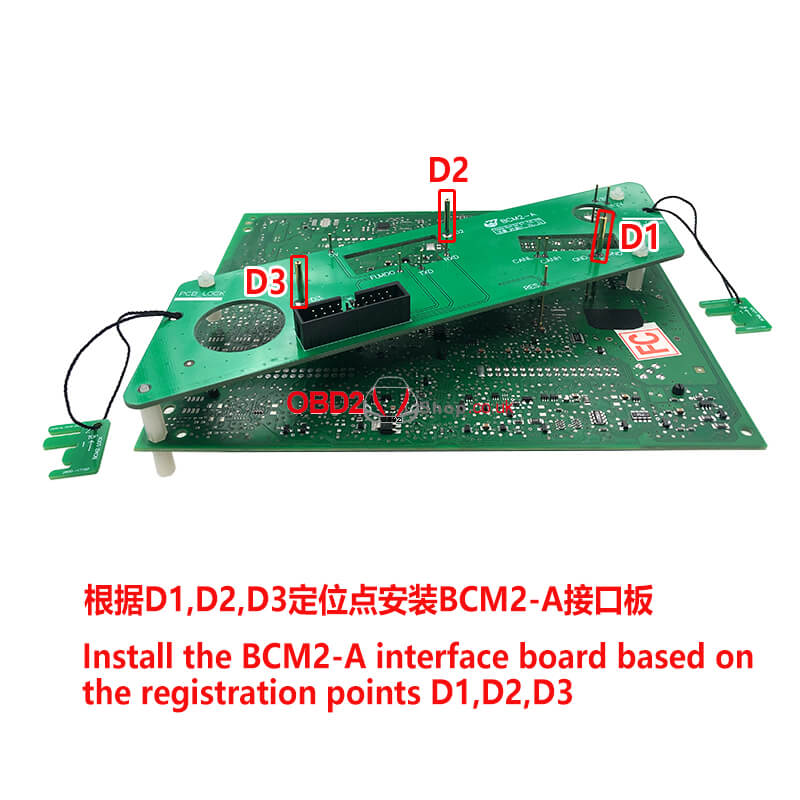
② Locate the D1, D2, D3 anchors on the BCM2 module.

yanhua-acdp-read-audi-a4-a5-q5-bcm2-encrypted-immo-data-6


③ Locate the probe test point location on the BCM2 module.

yanhua-acdp-read-audi-a4-a5-q5-bcm2-encrypted-immo-data-7

④ Install the interface board fixing studs.

yanhua-acdp-read-audi-a4-a5-q5-bcm2-encrypted-immo-data-8

⑤ Install BCM2-A interface board based on the registration point D1/D2/D3.

yanhua-acdp-read-audi-a4-a5-q5-bcm2-encrypted-immo-data-9

⑥ Lock the studs and clamp the PCB lock.

yanhua-acdp-read-audi-a4-a5-q5-bcm2-encrypted-immo-data-10

⑦ Short the jumper cap to the "CAN-R-NC" port according to the marked position.

yanhua-acdp-read-audi-a4-a5-q5-bcm2-encrypted-immo-data-11

⑧ Connect ACDP, OBP+ICP adapter, BCM2-A interface board and BCM2 module.

yanhua-acdp-read-audi-a4-a5-q5-bcm2-encrypted-immo-data-12

Step 3. Make dealer key


Prepare the BCM2 IMMO data obtained in step 2, and then put the blank key into the BAV-KEY adapter.

yanhua-acdp-read-audi-a4-a5-q5-bcm2-encrypted-immo-data-13

yanhua-acdp-read-audi-a4-a5-q5-bcm2-encrypted-immo-data-14

Step 4. OBD learn key

yanhua-acdp-read-audi-a4-a5-q5-bcm2-encrypted-immo-data-15

Done!


https://www.obd2shop.co.uk/