Monday, 25 April 2022

Yanhua Mini ACDP Module 24: 2018+ JLR IMMO Key Adding

Latest Yanhua Mini ACDP Module 24 can support to program 2018+ JLR key duplication. Includes RFA module + CPU SPC560B Blank Chip, no soldering, no risk. Experienced technicians can just buy SPC560B Blank Chip to refresh RFA module by themselves.


After programming 2018+ JLR keys, the vehicle still has all features as original, such as  start on emergency, comfort access, etc.

yanhua-mini-acdp-module-24-2018-2022-jlr-immo-key-adding-1

yanhua-mini-acdp-module-24-2018-2022-jlr-immo-key-adding-2

Functions

1. Supports new JLR 2018+ OBD key duplication(JPLA-14C104-AF).

2. Supports new JLR 2018+ key adding by replacing RFA blank processor or RFA module.


Prompt in Mini ACDP APP

The device does not obtain authorization of A702 module. The module name is New JLR (2018+) IMMO module, please click "Module List" to "Refresh" or "Add".

yanhua-mini-acdp-module-24-2018-2022-jlr-immo-key-adding-3

Note

1. It's risky to replace RFA blank processor or RFA module, please be careful. We provide blank processor and blank RFA module supporting service.

2. Module 24 NOT supported 2018+ JLR all keys lost.

3. Module 24 only supported key programming on car by OBD.

4. New key should support to modify ID(eg. Lonsdor JLR Key).


How to use Mini ACDP Module 24?

1. When writing data to blank processor, no need welding. Mini ACDP app can automatically detect pin. Data refresh is safe and reliable.


2. Yanhua platform can automatically detect the communication condition of RFA modules, including blank RFA modules and RFA modules after processor replacement.

yanhua-mini-acdp-module-24-2018-2022-jlr-immo-key-adding-4

3. Programming & learning keys by OBD, simple and efficient.

yanhua-mini-acdp-module-24-2018-2022-jlr-immo-key-adding-5


More questions, welcome to contact us.

http://blog.obd2shop.co.uk/yanhua-mini-acdp-module-24-2018-jlr-immo-key-adding/


Thursday, 7 April 2022

YANHUA Mini ACDP PC Software 1.0.50 Free Download & Installation

YANHUA Mini ACDP not only can work on Android/IOS phone, but also supports working on computers. This post is a guide to the free download & installation YANHUA Mini ACDP PC software.


Free Download Mini ACDP PC Software 1.0.50

http://www.acdpmaster.com/img/ACDP_exe/PC-ACDP-1.0.50-EN.zip

Download Running Environment in case error

http://acdpmaster.com/img/ACDP_exe/runtime.rar

Operating system: Win7, Win10(not support Windows XP)

Size: 150.32MB

Note: Do NOT save in Disk C.

(or follow the below steps to download)


Where to download Mini ACDP PC software?

1.Visit http://acdpmaster.com/

2.ACDP Series >> Download >> ACDP PC Software >> Download

yanhua-mini-acdp-pc-software-1-0-50-free-download-installation-1

yanhua-mini-acdp-pc-software-1-0-50-free-download-installation-2

yanhua-mini-acdp-pc-software-1-0-50-free-download-installation-3

How to install Mini ACDP PC software?

1.Extract downloaded package, send “PC-ACDP” to desktop and run it.

yanhua-mini-acdp-pc-software-1-0-50-free-download-installation-4


Note: If an error message is displayed or the application cannot be started. Please install “Running environment”.

“ To run this application, you first must install one of the following versions of the .NET framework:v4.0. Contact your application publisher for instructions about obtaining the appropriate version of the .NET framework.”

yanhua-mini-acdp-pc-software-1-0-50-free-download-installation-5

2.Download & extract “runtime” package, run “NDP452-X86-X64-ENU” >> Select license terms >> Install.

yanhua-mini-acdp-pc-software-1-0-50-free-download-installation-6

3.Run “vs2013_x86” >> Agree terms and conditions >> install.

yanhua-mini-acdp-pc-software-1-0-50-free-download-installation-7

4.Run “vs2010_x86” >> Accept license terms >> Install

yanhua-mini-acdp-pc-software-1-0-50-free-download-installation-8

5.Run “PC-ACDP” as administrator

Done.

yanhua-mini-acdp-pc-software-1-0-50-free-download-installation-9

yanhua-mini-acdp-pc-software-1-0-50-free-download-installation-10

Now you can start to use Mini ACDP software on PC normally.

http://blog.obd2shop.co.uk/yanhua-mini-acdp-pc-software-1-0-50-free-download-installation/

Tuesday, 15 March 2022

Don’t Know Which Yanhua Digimaster 3 Adapter to Use?

Question: One customer complained that he doesn’t know how to use Yanhua Digimaster 3 Mileage Correction Tool with various adapters:

”Digimaster 3 is faulty, it is not communicating with adapters at all!

BMW 1 series E87 35080 no adapter present

BMW 5 series E60 35080 no adapter present

BMW 6 series F12 35160 no adapter present

BMW CAS3

BMW CAS2 

Transit 2011 cluster eeprom

Jaguar XF 2012 cluster eeprom 

VW GOLF MK5 try to read eeprom no adapter present


Tried multiple time to read many different eeproms no adapter present. I do understand you like to think tool is fine, but I rub out of patience and I have tested for many times in very multiple cars.”


Obd2shop engineer replied

The question is because of wrong adapter was used with Digimaster III to read different car models. Here we provide the correct adapter & path in D3 to help succeed in cluster calibration.


BMW 35080 & 160DOWQ should work with Yanhua 35080 V6 adapter to read;

yanhua-digimaster-3-correct-adapter-conection-1


yanhua-digimaster-3-correct-adapter-conection-2


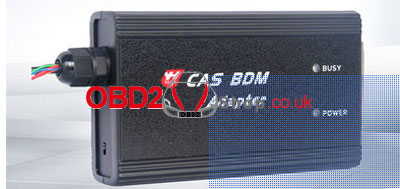
BMW CAS2 & CAS3 should work with Yanhua CAS BDM adapter to read;

yanhua-digimaster-3-correct-adapter-conection-3


Transit & Jaguar XF should work with OBP adapter to read;

yanhua-digimaster-3-correct-adapter-conection-4


VW Golf is supported to read by OBD directly.


How to find correct adapter & instructions in Digimaster3 ?

Here’s taking BMW 3 Series E90 as an example, all info can be found in same way of vehicle model options: 

Including wiring diagram, workable adapter & instructions.

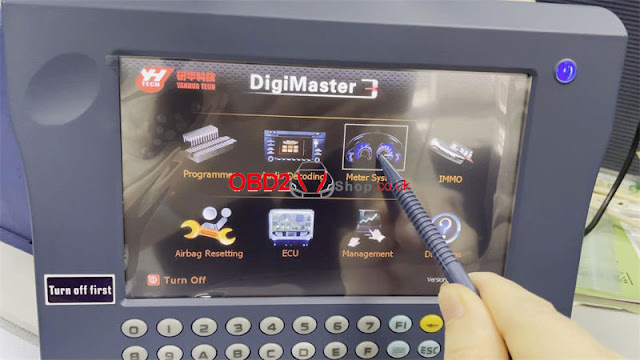
Path: Meter system >> Europe >> BMW >> 3 Series(E90) >> Meter adjustment >> 35080/ 35080 V6/ D80D0WQ

yanhua-digimaster-3-correct-adapter-conection-5

yanhua-digimaster-3-correct-adapter-conection-6

yanhua-digimaster-3-correct-adapter-conection-7

yanhua-digimaster-3-correct-adapter-conection-8

yanhua-digimaster-3-correct-adapter-conection-9

yanhua-digimaster-3-correct-adapter-conection-10

More any questions about the Yanhua D3 odometer correction tool, please let us know.

http://blog.obd2shop.co.uk/dont-know-which-yanhua-digimaster-3-adapter-to-use/


Friday, 11 March 2022

Yanhua Mini ACDP Program BMW CAS4+ All Key Lost via ICP

This is an operation guide on how to use Yanhua Mini ACDP to program BMW CAS4+ all key lost via ICP. Process includes 2 steps: read DME ISN code & program keys. Read the post to learn how to do.


Or check Youtube to learn:


Step1. Read DME ISN Code

Query the basic vehicle information according to VIN number. Here’s taking F chassis, DME model N20 as an example.

Click “Help” based on corresponding car model, here can check connection diagram.


Required Accessories:

DME Module

Yanhua N20 Interface Board

Yanhua Mini ACDP Master Host

20PIN Cable

OBP+ICP Adapter


1.Connect N20 interface board.

2.Short circuit CAN resistor on OBP+ICP adapter to the “CAN-R” JOIN side.

3.Connect ACDP host, OBP+ICP adapter, N20 interface board & DME.


Start Mini ACDP app, 

BMW >> DME ISN >> BENCH Mode Read/Write DME ISN >> Select chassis model: Fxx >> Select DME model: N20(MEVD1724) >> Read/write ISN >> OK >> OK

Backup file succeeded.

Record or export the IMMO information to save.

*The ISN code can be used for key programming, please remember the ISN folder path.

Reading ISN data finished.

yanhua-mini-acdp-program-bmw-cas4-all-key-lost-1

yanhua-mini-acdp-program-bmw-cas4-all-key-lost-2

yanhua-mini-acdp-program-bmw-cas4-all-key-lost-3

yanhua-mini-acdp-program-bmw-cas4-all-key-lost-4


Step2. Program Keys

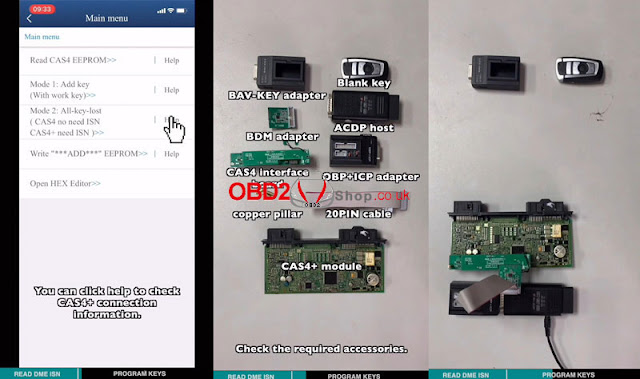
Click “Help” on CAS4+ all key lost to check connection diagram.

Remove CAS4+ module from vehicle, it’s generally under the steering wheel.


Required Accessories:

BAV-KEY adapter

BDM adapter

CAS4 interface board

Copper pillar

Blank key

ACDP host

OBP+ICP adapter

20PIN cable

CAS4+ module


1.Install the copper pillar. Align D1-D4 test points. Vertical press down the CAS4 interface board. Lock the board with PCB lock and copper pillar. As long as the 4 test points are aligned, then all test points are aligned.

2.Connect BDM adapter & CAS4+ module, connect OBP+ICP adapter & ACDP host.


Go to Mini ACDP BMW

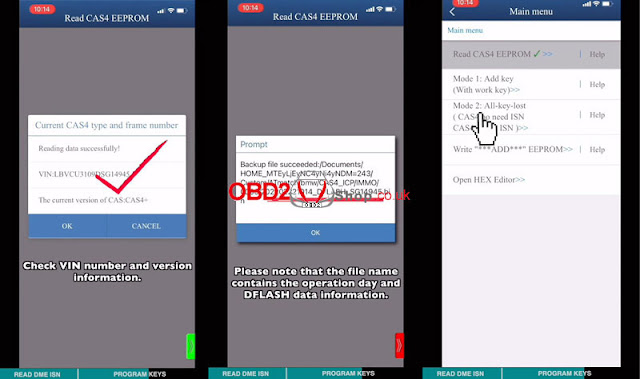
CAS1~4 >> CAS4/CAS4+ >> ICP mode >> Select chip model: ICP 9S12XEP100(Mask 5M48H/1N35H) >> IMMO >> Read CAS4 EEPROM >> OK


Pin detection passed.

If failed, please check & clean the test points.


Check VIN and version info, click “OK”.

Backup file succeeded.

*Please note the file name contains operation day & DFLASH data info.

Reading data successfully!


Continue to “All key lost”.

yanhua-mini-acdp-program-bmw-cas4-all-key-lost-5

yanhua-mini-acdp-program-bmw-cas4-all-key-lost-6

yanhua-mini-acdp-program-bmw-cas4-all-key-lost-7

yanhua-mini-acdp-program-bmw-cas4-all-key-lost-8


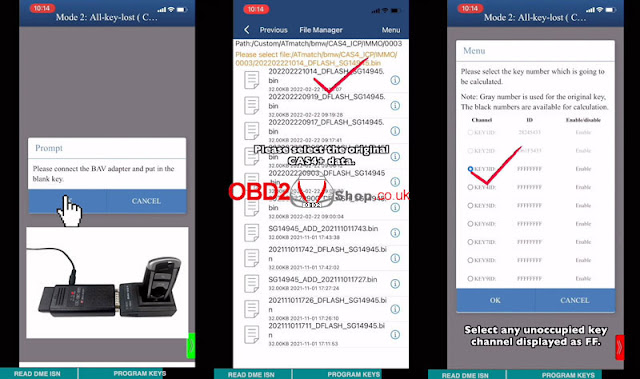
Connect BAV adapter and put in the blank key.

Key info was read out, click “OK”.

Select original CAS4+ data >> OK >> Select an unoccupied key channel displayed as FF.

Type in or import the ISN code file in previous step.

Check the ISN code, click “OK”.

Programming key successful!


Method1. Put the CAS module back to BMW. Put the new key on the emergency induction coil, then press START to synchronize the key.


Method2. If the induction coil is damaged or the key cannot be learned, write CAS data back.

Write ADD EEPROM >> OK >> OK >> Load the new CAS4+ data

Program execution completed!

Put CAS4+ module back to the vehicle.

Done.

yanhua-mini-acdp-program-bmw-cas4-all-key-lost-9

yanhua-mini-acdp-program-bmw-cas4-all-key-lost-10

yanhua-mini-acdp-program-bmw-cas4-all-key-lost-11


http://blog.obd2shop.co.uk/yanhua-mini-acdp-program-bmw-cas4-all-key-lost-via-icp/

Sunday, 27 February 2022

Yanhua Mini ACDP + Module 13 Clone VW Audi DQ200/250 Gearbox

Yanhua Mini ACDP + Module 13 is supported to clone VW(Volkswagen), Audi DQ200(0AM/0CW), DQ250(02E/0D9), DL382(0CK), DL501(0B5), VL381(0AW) models, etc. Here is taking Audi DQ200 & DQ250 gearbox clone as demonstration.

Check our Youtube:


VW Audi DQ250 Gearbox Clone

Click “Help” to find connection info.

Required Accessories:

DQ250 module

OBP+ICP adapter

ACDP host

DQ250 interface board

20PIN cable


Connection

1.Install DQ250 interface board.

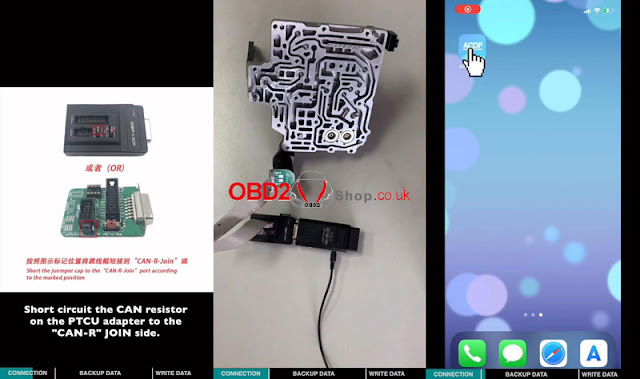
2.Short circuit the CAN resistor on PTCU adapter to the “CAN-R” JOIN side.

3.Connect OBP+ICP adapter, interface board & ACDP host.

yanhua-mini-acdp-clone-vw-audi-dq200-250-gearbox-1

yanhua-mini-acdp-clone-vw-audi-dq200-250-gearbox-2


Operation

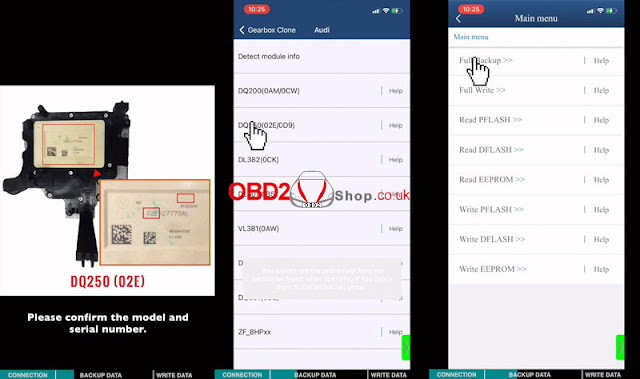
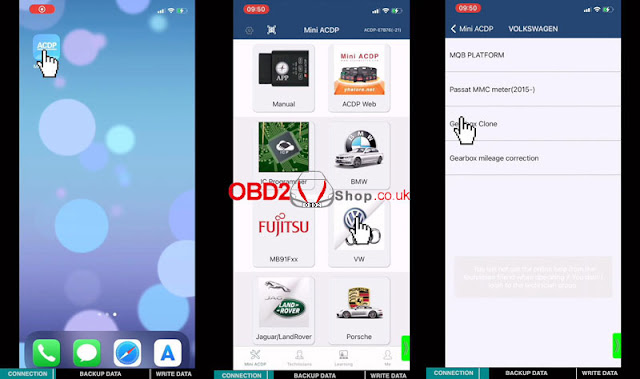
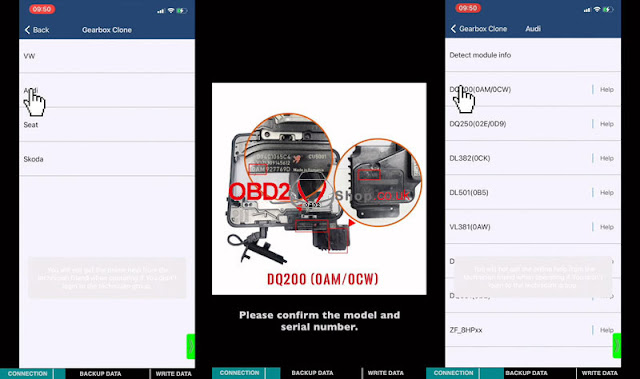
Mini ACDP >> VW >> Gearbox clone >> Audi >> Confirm model & SN >> DQ250(02E/0D9) >> Full backup

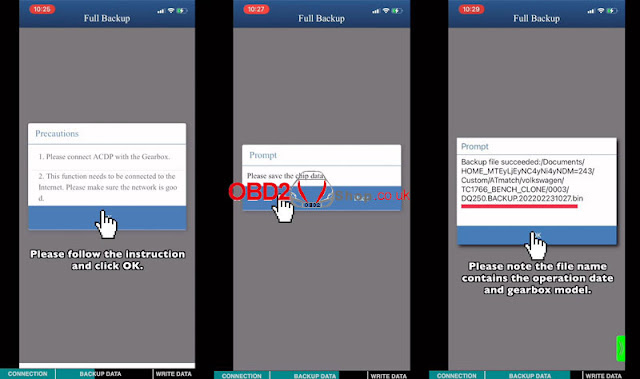
Follow the instruction, then click “OK”.

1.Connect ACDP with Gearbox.

2.This function needs to be connected to the Internet. Make sure the network is good.


Confirm the gearbox model, continue >> OK

Backup file succeeded(record its filename & location).

OK >> OK

yanhua-mini-acdp-clone-vw-audi-dq200-250-gearbox-3

yanhua-mini-acdp-clone-vw-audi-dq200-250-gearbox-4

yanhua-mini-acdp-clone-vw-audi-dq200-250-gearbox-5


Connect another DQ250 gearbox & prepare to write the original data.

Full write >> OK >> Continue >> OK >> Select the backup data saved before

Writing PFLASH data...

Writing EEPROM data...

Data wrote successfully!

yanhua-mini-acdp-clone-vw-audi-dq200-250-gearbox-6

yanhua-mini-acdp-clone-vw-audi-dq200-250-gearbox-7

VW Audi DQ200 Gearbox Clone

Click “Help” to find connection info.

Required Accessories:

DQ200 module

OBP+ICP adapter

ACDP host

DQ200 interface board

20PIN cable


Connection

1.Install DQ200 interface board.

2.Short circuit the CAN resistor on the PTCU adapter to the “CAN-R” JOIN side.

3.Connect OBR+ICP adapter, interface board & ACDP host.

yanhua-mini-acdp-clone-vw-audi-dq200-250-gearbox-8


Operation

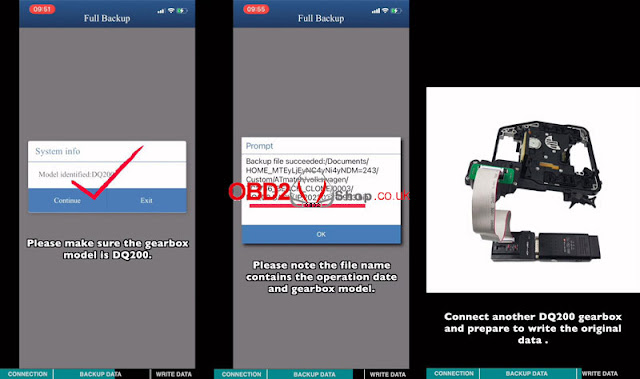
Mini ACDP >> VW >> Gearbox clone >> Audi >> Confirm model & SN >> DQ200(0AM/0CW) >> DQ200Dxx/DQ200_MQB (Choose depend on SN, check Help) >> Full backup

1.Connect ACDP with Gearbox.

2.This function needs to be connected to the Internet. Make sure the network is good.

Confirm model, continue >> OK >> OK

Backup file succeeded.

Please record the file name & location.


Connect another DQ200 gearbox & prepare to write the original data.

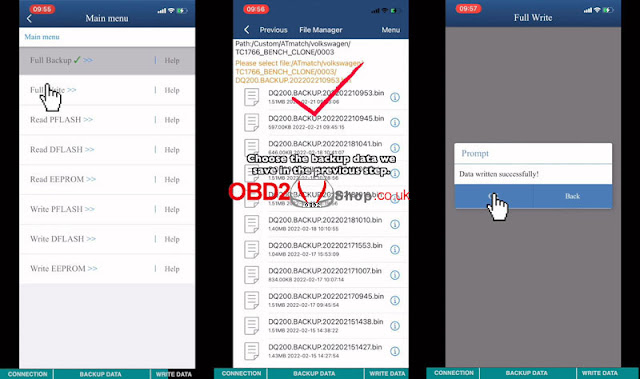
Full write >> Follow the instruction, OK >> Confirm model, continue >> Select the backup data saved just now

Writing PFLASH data...

Writing EEPROM data...

Data wrote successfully!

yanhua-mini-acdp-clone-vw-audi-dq200-250-gearbox-9

yanhua-mini-acdp-clone-vw-audi-dq200-250-gearbox-10

yanhua-mini-acdp-clone-vw-audi-dq200-250-gearbox-11

yanhua-mini-acdp-clone-vw-audi-dq200-250-gearbox-12

yanhua-mini-acdp-clone-vw-audi-dq200-250-gearbox-13


The Yanhua ACDP Module 13 has replaced the traditional wire method to be more simple & efficient. Plug & play to support Seat, Skoda as well.

http://blog.obd2shop.co.uk/yanhua-mini-acdp-module-13-clone-vw-audi-dq200-250-gearbox/