Sunday, 7 May 2023

How to Replace Yanhua KVM SPC56B Chip for 2018+ JLR?

RFA Module CPU SPC560B Blank Chip supports programming JPLA, K8D2, and J9C3 initial data with Yanhua Mini ACDP + Module 24 for 2018+ JLR key adding. Removing the RFA module to replace the SPC56B chip for writing data without soldering. This is a tutorial on how to unsolder the KVM SPC56B chip step by step with Yanhua JLR KVM soldering tool kits.


Part1: Remove SPC56B Chip

Check the full video:

It needs to remove the paint and the chip.

1. Apply paint remover to the top of the chip and the pins, you can see the protective paint start to peel off after 30s. apply the paint remover to the pin area. After about the 90s, you can start cleaning the chip with cotton. Then clean the board with contact cleaner to avoid corrosion of the board paint remover. This is the effect after paint removal and cleaning.

replace-yanhua-kvm-spc56b-chip-for-jlr-1

2. Install the chip limit plate, and apply solder paste to the chip pins. Use temperature and airflow adjustable hot air gun to desolder chip. Use a clamp to secure the chip limit plate.

replace-yanhua-kvm-spc56b-chip-for-jlr-2

3. Adjust the height of the hot air gun, to 8mm above the chip limit plate. Adjust the air volume to 8 gears. Adjust the preheating temperature to 250℃. Start the hot air gun, keep the temperature at 250℃ preheats for the 90s.

replace-yanhua-kvm-spc56b-chip-for-jlr-3

replace-yanhua-kvm-spc56b-chip-for-jlr-4

4.After 90s, raise the temperature to 420℃ and heat for 25s. at this point, use tweezers to hold one corner of the chip. When the chip is loose, clip up the chip. About 25s, the chip is loose, remove the air gun and clip up the chip.

replace-yanhua-kvm-spc56b-chip-for-jlr-5

replace-yanhua-kvm-spc56b-chip-for-jlr-6

5. Clean the bottom and pins of the chip with paint remover. Then clean the board with contact cleaner to avoid corrosion of the board paint remover. There is the original plate solder on the pad. Please check whether there is a short circuit between the plate.

replace-yanhua-kvm-spc56b-chip-for-jlr-7

Part2: Solder SPC56B Chip

Check the full video:

1. Apply the solder paste to the chip pad, and install the chip limit plate. Use clamps to secure the chip limit plate.

replace-yanhua-kvm-spc56b-chip-for-jlr-8

replace-yanhua-kvm-spc56b-chip-for-jlr-9

2. Please use Yanhua SPC560B Blank Chip, Yanhua has added solder for the chip pin before delivery. Gently place the chip into the chip limit plate. Please note the chip pin direction. The dimple on the chip is pin1. Apply solder paste to the chip pins and the top of the chip. Check that the chips are placed correctly.

replace-yanhua-kvm-spc56b-chip-for-jlr-10

replace-yanhua-kvm-spc56b-chip-for-jlr-11

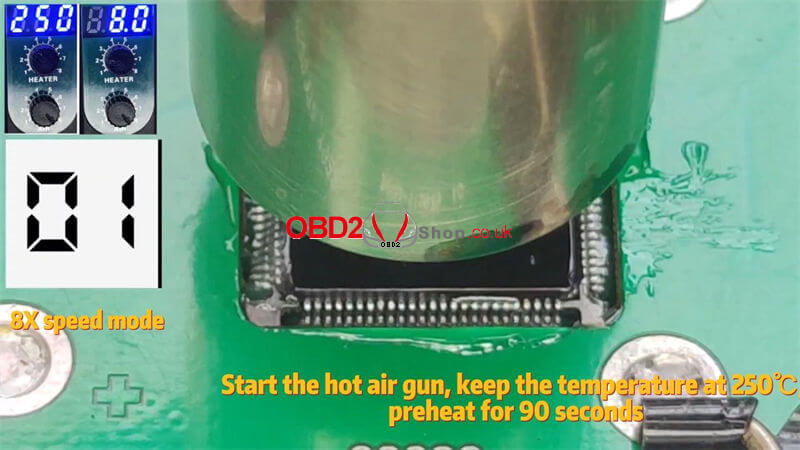
3. Use temperature and air volume adjustable hot air gun to blow and solder chip. Adjust the height of the hot air gun, to 8mm above the chip limit plate. Adjust the air volume to 8 gears, and adjust the preheating temperature to 250℃. Start the hot air gun, and keep the temperature at 250℃ preheats for the 90s.

4. After 90s, raise the temperature to 340℃ and heat for 25s. You can see that the solder on the pin is starting to merge with the solder on the pad. After 25s, please shut down and remove the gun.

replace-yanhua-kvm-spc56b-chip-for-jlr-12

replace-yanhua-kvm-spc56b-chip-for-jlr-13

5. Use contact cleaner to clean the solder paste on the chip. This is the final result after welding and cleaning.

replace-yanhua-kvm-spc56b-chip-for-jlr-14

www.obd2shop.co.uk


Friday, 5 May 2023

BMW E Chassis 8HP EGS ISN refresh by Yanhua ACDP and Module 11

This post will guide you on how to use Yanhua Mini ACDP and ACDP Module 11 to do BMW E chassis 8HP EGS ISN refresh.


Check all the accessories we need:

ACDP main unit

OBP ICP adapter

8HP interface board

20Pin cable


Install the 8HP interface board

Connect the OBP ICP adapter

Short the CAN resistor on the OBP ICP adapter to the"CAN R JOIN" terminal

Connect the ACDP host

Power up the ACDP host

bmw-e-chassis-8hp-egs-isn-refresh-by-acdp-1

bmw-e-chassis-8hp-egs-isn-refresh-by-acdp-2

Open ACDP software

Please confirm the ACDP host is properly connected

Click "BMW">>"EGS">>"8HP ISN Clear (supports E chassis)">>"Clear ISN"

Confirm that the ACDP device is connected to the EGS module, and click "Continue"

bmw-e-chassis-8hp-egs-isn-refresh-by-acdp-3

bmw-e-chassis-8hp-egs-isn-refresh-by-acdp-4

Confirming that EGS supports clearing ISN and ISN not cleared, click "Continue"

Confirm the system programming information

Click continue to start programming the EGS module

The EGS module is being programmed...

ISN data is being cleared...

Clearing ISN data successfully

bmw-e-chassis-8hp-egs-isn-refresh-by-acdp-5

bmw-e-chassis-8hp-egs-isn-refresh-by-acdp-6

Click on the EGS status

Confirm that the ACDP device is connected to the EGS module

Confirm that the ISN has been cleared

bmw-e-chassis-8hp-egs-isn-refresh-by-acdp-7

bmw-e-chassis-8hp-egs-isn-refresh-by-acdp-8

Done!


For more details on the operation, please refer to the following video:

Friday, 21 April 2023

BMW F chassis 8HP EGS ISN refresh by Yanhua ACDP and Module 11

This post will guide you on how to use Yanhua Mini ACDP and ACDP Module 11 to do BMW F chassis 8HP EGS ISN refresh.


Check all the accessories we need

ACDP host

OBP ICP adapter

8HP interface board

20 PIN cable


Installing the 8HP interface board

Connect the OBP ICP adapter

Short the CAN resistor on the OBP ICP adapter to the "CAN R JOIN" side.

Connect the ACDP host

Power up the ACDP host


bmw-f-chassis-8hp-egs-isn-refresh-by-acdp-1

bmw-f-chassis-8hp-egs-isn-refresh-by-acdp-2

Open ACDP software

Please confirm the ACDP host is properly connected

Click "BMW">>"EGS">>"8HP ISN Clear (support F chassis")>>"Clear ISN"

Make sure that the ACDP device is connected to the EGS module

bmw-f-chassis-8hp-egs-isn-refresh-by-acdp-3

bmw-f-chassis-8hp-egs-isn-refresh-by-acdp-4

Confirm that the EGS supports clearing ISN and ISN is not cleared.

Click"Continue"

Start programming the EGS module soon...

EGS module is being programmed

bmw-f-chassis-8hp-egs-isn-refresh-by-acdp-5

ISN data is being cleared...

ISN data cleared successfully

Then we click EGS status

Make sure that the ACDP device is connected to the EGS module

Confirm that the EGS ISN has been cleared.

bmw-f-chassis-8hp-egs-isn-refresh-by-acdp-6

bmw-f-chassis-8hp-egs-isn-refresh-by-acdp-7

Done!


For more details on the operation, please refer to the following video:

Wednesday, 22 March 2023

Yanhua Mini ACDP Adds Audi Gen5 BCM2 Encrypted Key

Yanhua Mini ACDP + Module 29 can support reading Audi Gen5 encrypted version BCM2 IMMO data by ICP for key adding. Also, it can read unencrypted and partially encrypted version BCM2 IMMO data by OBD. Follow the steps below to learn how to do it.


Step1. OBD Identify

Mini ACDP >> VW >> Audi 5th BCM2 IMMO >> Step1: OBD identify >> Read vehicle info


Connect ACDP to vehicle OBDII!

If have a working key, please insert it to/ near the ignition switch and light the meter!

If all key lost, please open the car light and press the brake several times!

Press "Continue".


Confirm the system information, and press "OK".

Save vehicle data file: OK >> OK

Please confirm the system information:

The working key has been detected, it's an encrypted BCM2 version. Need to read IMMO data by ICP mode, no need to synchronize data. Press "OK".

yanhua-mini-acdp-adds-audi-gen5-bcm2-encrypted-key-1

yanhua-mini-acdp-adds-audi-gen5-bcm2-encrypted-key-2

yanhua-mini-acdp-adds-audi-gen5-bcm2-encrypted-key-3

Step2. Get BCM2 IMMO Data

Step2: Get BCM2 IMMO data >> ICP read IMMO data - BCM2 encrypted(according to the system info in step1) >> Help

Here to check the disassembly instructions:

Remove the BCM2 module from the trunk of the vehicle. When removing the BCM2 plugs, please remove the no.1 plug at first, then no.2, and finally other plugs.


A4L/A5/Q5 2014- add key or lost all key(all version) >> Help

Here to check the detailed connection steps:


Required Accessories

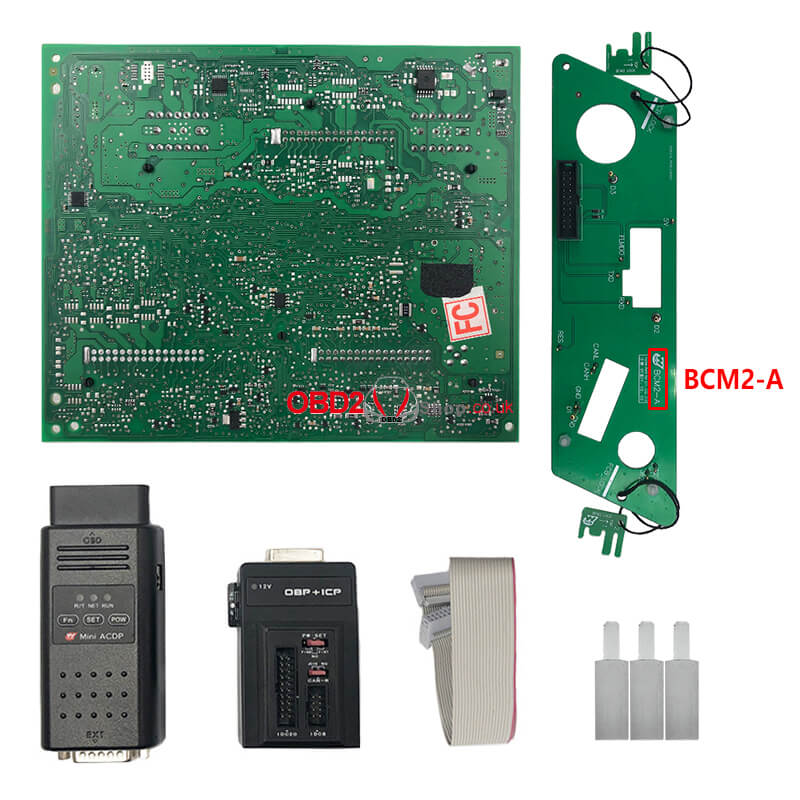
OBP+ICP adapter

ACDP host

20PIN cable

BCM2-A interface board

BCM2 module


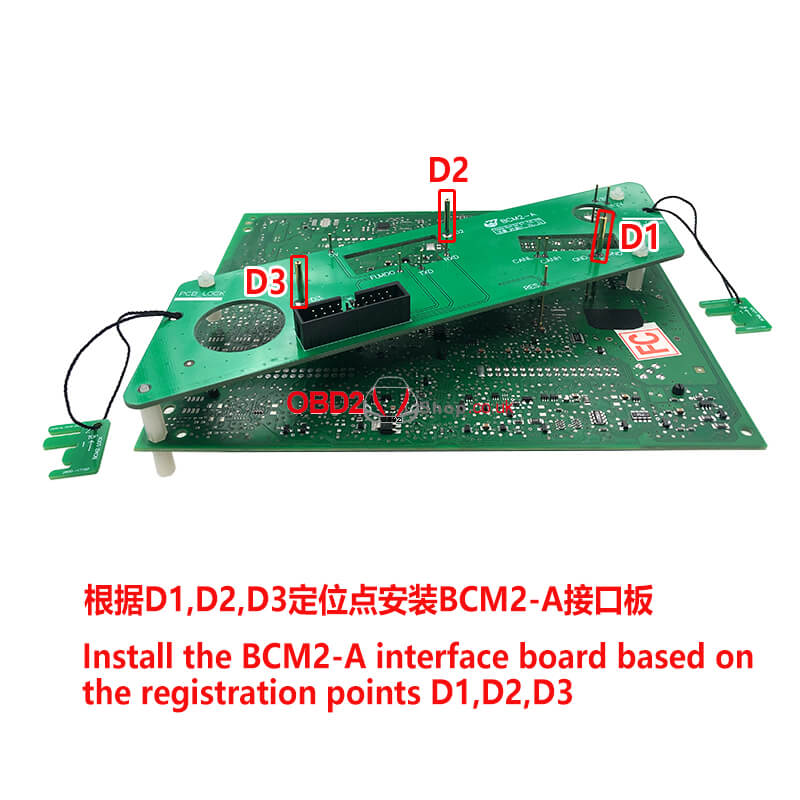
1. Install the interface board fixing studs. Install the BCM2-A interface board according to D1, D2, and D3 positioning points. Fasten the PCB lock and lock the studs.

2. Connect the 20PIN cable to the OBP+ICP adapter. Short the jumper cap to the "CAN-R-NC" end of the adapter. Please note that if you use the BCM2-B interface board, you need to short the jumper cap to the "CAN-R-JOIN" end.

3. Connect to Mini ACDP and power it on.

yanhua-mini-acdp-adds-audi-gen5-bcm2-encrypted-key-4

yanhua-mini-acdp-adds-audi-gen5-bcm2-encrypted-key-5

yanhua-mini-acdp-adds-audi-gen5-bcm2-encrypted-key-5

Read IMMO data(Automatic) >> Continue

Note: Please DO NOT move the module, harness, and power during the operation!

Continue >> Continue

About to start getting data from the server. please keep the network open during the process.

Save BCM2 CONF data.

Save BCM2 IMMO data.

Save BCM2 serve data.

Confirm the system information, and press "OK".


Ready to write data, DO NOT power off or unplug the device during the operation!

Press "OK".


Get BCM2 IMMO data finished, please restore the BCM2 module and check whether the vehicle status is normal!

OK >> OK

When installing the BCM2 plugs, please install the no.2 plug at first, then the no.1, and finally the other plugs.

Go back to the main menu.

yanhua-mini-acdp-adds-audi-gen5-bcm2-encrypted-key-7

yanhua-mini-acdp-adds-audi-gen5-bcm2-encrypted-key-8

yanhua-mini-acdp-adds-audi-gen5-bcm2-encrypted-key-9

Step3. Make Dealer Key

Step3: Make dealer key >> A4L/A5/Q5 add a key or lost all key - Don't need working key

Connect ACDP to the BAV-KEY adapter and place the blank key correctly on the BAV-KEY adapter. Press "Continue".

Confirm the key information.

Select BCM2 IMMO data obtained in step 2.

Ready to program keys, please DO NOT power off or unplug the device during the operation!

Make dealer key finish.

yanhua-mini-acdp-adds-audi-gen5-bcm2-encrypted-key-10

yanhua-mini-acdp-adds-audi-gen5-bcm2-encrypted-key-11

Step4. OBD Learn Key

Step4: OBD learn key >> Start learn key

Connect ACDP to vehicle OBD!!!

If have a working key, please insert it to/ near the ignition switch and light the meter!

If all key lost, open the headlight and step on the brake!

Confirm the system information.

Select BCM2 IMMO data obtained in step 2.

Please enter the number of learning keys: 2


1. Have all the keys of the current car ready, the unlearned keys will not be able to start the car.

2. Insert the key to be learned into the ignition switch in turn, and when a key is successfully learned, the X of X/Y in the instrument screen will be added by 1.

3. If there is only an induction coil, you need to close and open the start button after each key learning.

4. Insert a key that needs to be learned into the ignition. Press "Continue".


The first key learning is finished, please insert the second key.

The second key learning is finished.

Done.

yanhua-mini-acdp-adds-audi-gen5-bcm2-encrypted-key-12

yanhua-mini-acdp-adds-audi-gen5-bcm2-encrypted-key-13

www.obd2shop.co.uk

Wednesday, 8 March 2023

Yanhua ACDP read IMMO data for Audi A4/A5/Q5 (BCM2 encrypted) by ICP

Yanhua recently released ACDP module 29: Audi Gen5 BCM2 IMMO Module, which supports adding keys and all keys lost for Audi A4/A5/Q5 2013-2018 and other models. Support adding keys for Audi A6/A7/A8 2013-2019 and other models.


This article will take Audi A4/A5/Q5 BCM2 encrypted as an example to show you how to use the ACDP+29 module to read IMMO data via ICP.


Select "VW" on the ACDP APP interface and enter "Audi 5th BCM2 IMMO".

yanhua-acdp-read-audi-a4-a5-q5-bcm2-encrypted-immo-data-1

Step 1. OBD identify

yanhua-acdp-read-audi-a4-a5-q5-bcm2-encrypted-immo-data-2

Step 2. Get BCM2 IMMO data

yanhua-acdp-read-audi-a4-a5-q5-bcm2-encrypted-immo-data-3

yanhua-acdp-read-audi-a4-a5-q5-bcm2-encrypted-immo-data-4

Note: To begin this step, you need to connect the relevant equipment.


① Prepare ACDP, OBP+ICP adapter, BCM2-A interface board and BCM2 module.

yanhua-acdp-read-audi-a4-a5-q5-bcm2-encrypted-immo-data-5


② Locate the D1, D2, D3 anchors on the BCM2 module.

yanhua-acdp-read-audi-a4-a5-q5-bcm2-encrypted-immo-data-6


③ Locate the probe test point location on the BCM2 module.

yanhua-acdp-read-audi-a4-a5-q5-bcm2-encrypted-immo-data-7

④ Install the interface board fixing studs.

yanhua-acdp-read-audi-a4-a5-q5-bcm2-encrypted-immo-data-8

⑤ Install BCM2-A interface board based on the registration point D1/D2/D3.

yanhua-acdp-read-audi-a4-a5-q5-bcm2-encrypted-immo-data-9

⑥ Lock the studs and clamp the PCB lock.

yanhua-acdp-read-audi-a4-a5-q5-bcm2-encrypted-immo-data-10

⑦ Short the jumper cap to the "CAN-R-NC" port according to the marked position.

yanhua-acdp-read-audi-a4-a5-q5-bcm2-encrypted-immo-data-11

⑧ Connect ACDP, OBP+ICP adapter, BCM2-A interface board and BCM2 module.

yanhua-acdp-read-audi-a4-a5-q5-bcm2-encrypted-immo-data-12

Step 3. Make dealer key


Prepare the BCM2 IMMO data obtained in step 2, and then put the blank key into the BAV-KEY adapter.

yanhua-acdp-read-audi-a4-a5-q5-bcm2-encrypted-immo-data-13

yanhua-acdp-read-audi-a4-a5-q5-bcm2-encrypted-immo-data-14

Step 4. OBD learn key

yanhua-acdp-read-audi-a4-a5-q5-bcm2-encrypted-immo-data-15

Done!


https://www.obd2shop.co.uk/


Tuesday, 21 February 2023

Can Yanhua Mini ACDP Module 24 Add 2022 Range Rover Key?

Generally speaking, the answer is yes. Yanhua Mini ACDP + Module 24 can support the program of JLR 2018+ new keys by OBD or replacing RFA. If you're not sure, here's a way to help identify the key.


Mini ACDP >> Jaguar/ LandRov >> Program smart key(2018-) >> Replace RFA program key >> Check whether support key programming: OBD identifies original RFA info

Follow the steps instructions in "Help" to identify.


Note:

1. Please connect ACDP with OBDII properly.

2. Please don't cut the power or pull out the device during the operation.

yanhua-mini-acdp-module-24-add-2022-range-rover-key-1

yanhua-mini-acdp-module-24-add-2022-range-rover-key-2

yanhua-mini-acdp-module-24-add-2022-range-rover-key-3

yanhua-mini-acdp-module-24-add-2022-range-rover-key-4

yanhua-mini-acdp-module-24-add-2022-range-rover-key-5

Technical Support

www.obd2shop.co.uk